How Virtual DOM works under the hood

Have your ever thought how instantly the change is seen on the screen when you click that UI button to add number of items while online shopping on Flipkart?
It feels instant. But under the hood React is handling so much work on your browser. React does everything so fast that you won't believe React is doing that process on every click & interaction.
The major reason for this instant behaviour of the websites like Flipkart that uses React is how React works under the hood. To be specific, the answer is Virtual DOM.
By the end of this article you'll understand: React Internals, Virtual DOM, Diffing , Reconciliation, Fiber.
But firstly let's understand why was Virtual DOM even introduced in the first place while every browsers were using the Real DOM? Why reinventing the wheel? Wasn't DOM enough? Let's dissect from the beginning.
The real problem: DOM is slow
The browser’s Real DOM is a tree of objects representing every element on the page. When you change something i.e. text, a style, a node, the browser has to:
Recalculate styles
Redraw layout
Repaint pixels on the screen
Even a single change can trigger a chain of expensive recalculations. In complex UIs & dashboards with many elements, updating the Real DOM directly over and over quickly becomes really slow. That’s the core problem React’s Virtual DOM solves.
Real DOM vs Virtual DOM
The actual real DOM lives inside the browser. Whereas the Virtual DOM is the lightweight in memory representation of the real dom. It acts as a middle layer between UI & the real dom.
React performs all its heavy thinking in Virtual DOM, and only touches the Real DOM with the absolute minimal changes needed.
| Real DOM | Virtual DOM |
|---|---|
| Real DOM represent actual structure of the webpage. | Virtual DOM represent the virtual/memory representation of the Webpage. |
| DOM manipulation is very expensive | DOM manipulation is very easy |
| There is too much memory wastage | No memory wastage |
| It updates Slow | It updates fast |
| It can directly update HTML | It can't update HTML directly |
| Creates a new DOM if the element updates. | Update the JSX if the element update |
| It allows us to directly target any specific | |
| node (HTML element) | It can produce about 200,000 Virtual DOM |
| Nodes / Second. | |
| It represents the Ul of your application | It is only a virtual representation of the DOM |
Let's start with a basic counter button example.
import React, { useState } from 'react'

const App = () => {
    const [count, setCount] = useState(0)
  return (
    <div>
    <button onClick={()=>setCount(count+1)}>
        +
    </button>
    <h1>
        Count Value: {count}
    </h1>
    </div>
  )
}

export default App
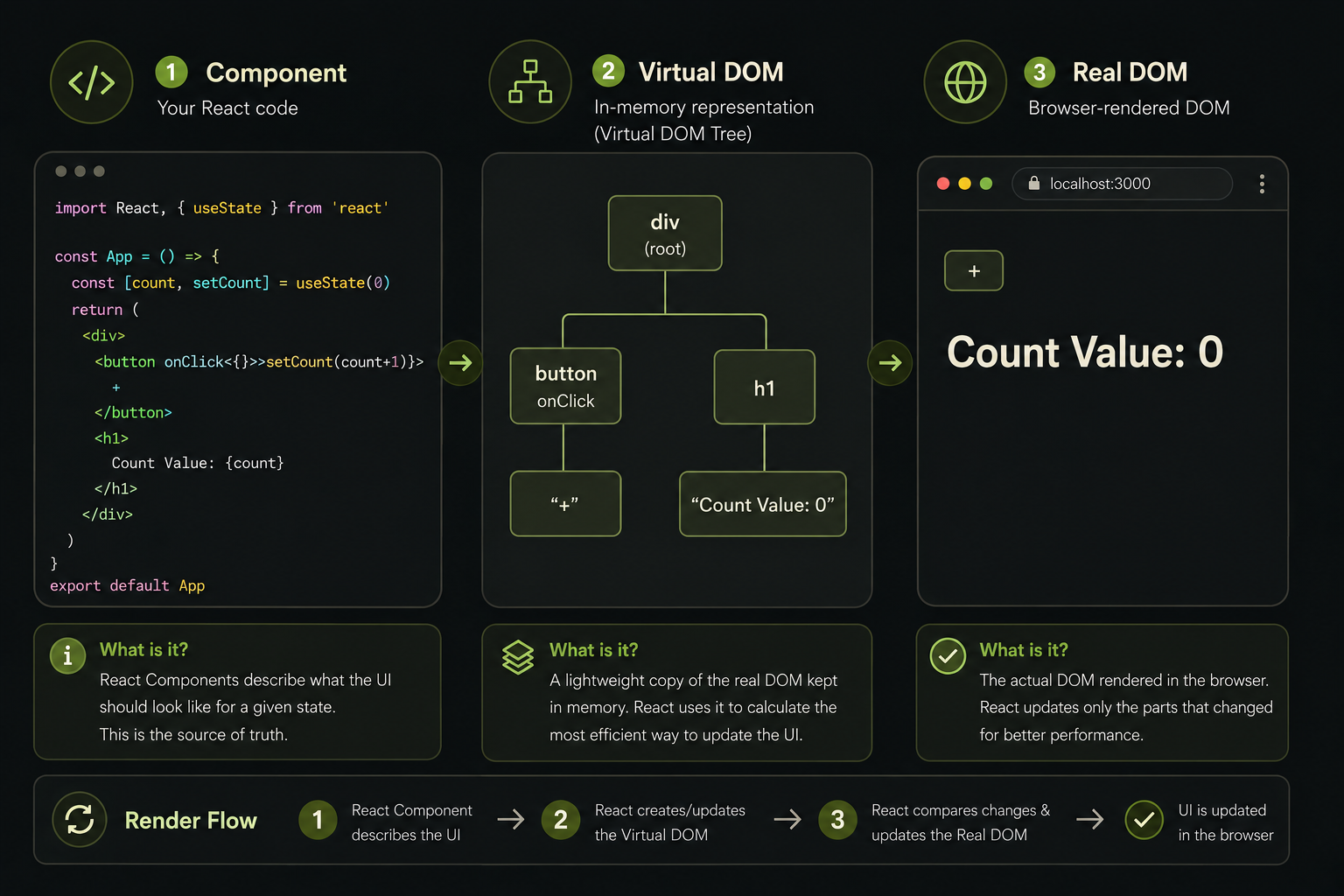
According to this code, when you click on the + button, the value of count is incremented by 1 through useState hook & that's showcased on UI.
That's it. It's that simple on UI level and code.
Now let's understand how React processes everything internally, what actually happens under the hood.
The React update lifecycle
Let’s walk through exactly what happens from the moment you load the page to the moment you see the updated counter.
1. Initial render – from component to Real DOM (render phase)
When your app mounts firstly:
React converts your JSX (the
<div>,<button>,<h1>) intoReact.createElementcalls.This produces a tree of plain JavaScript objects – the first Virtual DOM tree.
This tree is lightweight. A
<div>is just an object like{type: 'div', props: {…}, children: […]}.React then commits this tree to the Real DOM only once, building the actual DOM nodes that the browser displays.
Component → Virtual DOM → Real DOM
React keeps a reference to this current Virtual DOM tree. It’s the source of truth for the next update.
2. State (or props) change triggers a re‑render
After the UI is painted on the browser screen, when you click the + button, setCount(count + 1) runs. This queues a state update. React batches updates for efficiency. That means even if you clicked twice rapidly, it might combine them into a single re‑render to minimize no. of calculations.
Keep this in mind: Every state change causes re-render.
3. A brand‑new Virtual DOM tree is created
React calls your component function again (App()). Because count is now 1, the returned JSX is slightly different:
The
<div>and<button>are identical.The
<h1>now has a different child text:"Count Value: 1"instead of"Count Value: 0".
This call produces a new Virtual DOM tree – a fresh JavaScript object tree. Now React holds two trees in memory:
The old tree (previous state)
The new tree (work‑in‑progress)
Keep this in mind: No Real DOM changes have happened yet.
4. Diffing (reconciliation) – finding the minimal changes (diff phase)
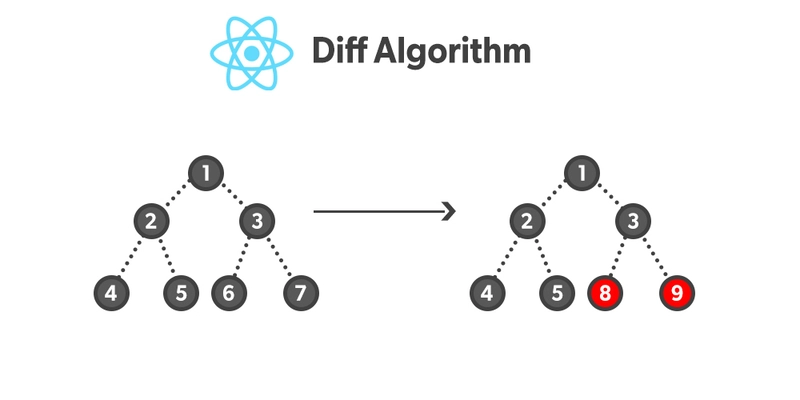
Here’s where the performance magic lives. Reconciliation is simply the process of comparing the old Virtual DOM tree with the new one to figure out what actually changed.
React walks through both trees parallelly:
The root
<div>– same type? Yes. Move inside.First child
<button>– same type, same props, same children. No change.Second child
<h1>– same type. Compare its children.Old:
["Count Value: 0"]New:
["Count Value: 1"]Only the text content inside the same text node is different.
React records exactly one minimal mutation: “update the text node inside <h1>”. The button and div are completely untouched since they have no change.
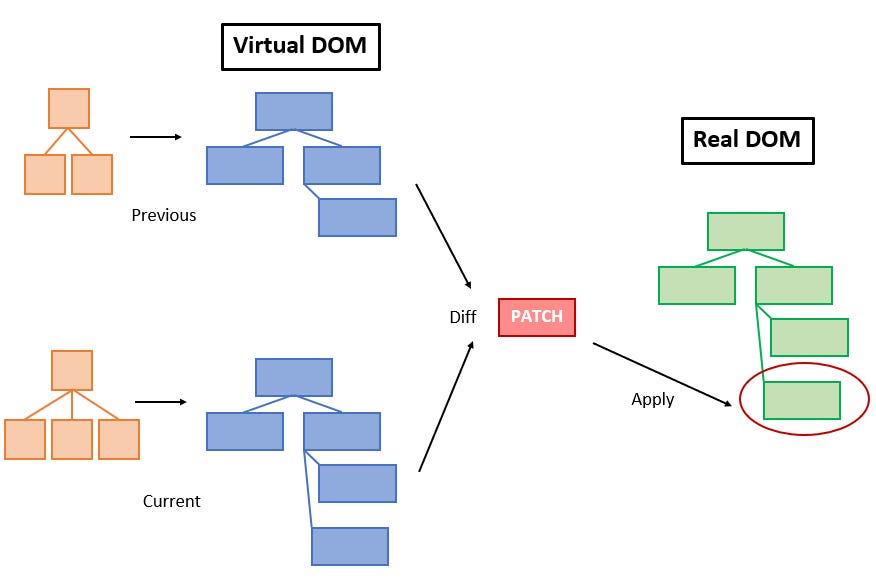
This output is often called a diff list or a patch. It’s just the list of changes that need to reach the Real DOM.
So Reconciliation simply means: two VDOM trees → compare them → generate minimal change list.
5. Updating only changed nodes in the Real DOM (commit phase)
Now React enters the commit phase. It takes the generated diff list and applies only those changes to the Real DOM:
It finds the real
<h1>text node and updates it from0to1.The
<div>and<button>are never touched, saving unnecessary reflow work.
Once committed, the browser repaints only the parts that changed – and you instantly see Count Value: 1 on screen without any page reload.
After the commit, the new Virtual DOM tree becomes the new “current” tree for the next round of updates. It's kept in memory while the old tree is discarded.
Why this approach improves performance
JavaScript objects are cheap. Creating and comparing them is way faster than reaching out to the Real DOM.
Batching. React can process multiple state updates at once and hit the Real DOM once. This reduces large number of redundant calculations & improves performance.
Minimal real DOM operations. Only the nodes that actually changed are updated which is way more faster than re-painting everything in Real DOM.
All of this internal working of React leads to buttery‑smooth experience, even when dozens of components update simultaneously.
High‑level overview: render → diff → commit flow
The entire React update lifecycle can be visualised as three phases:
Render Phase: Create new Virtual DOM -> Diff Phase: Compare old & new VDOM (Reconciliation) -> Commit Phase: Apply Minimal Updates to Real DOM
The complete journey of a single click summarized (React update lifecycle visualized)
Initial Render – Component → Virtual DOM → Real DOM built and painted.
Click –
setCounttriggers state update.Re‑render – React calls
App()again, producing a new Virtual DOM tree.Diffing (Reconciliation) – The new tree is compared with the old tree. React finds only the
<h1>text changed.Commit – React updates only that text node in the Real DOM.
Swap & Paint – The new Virtual DOM becomes the current tree; browser repaints the changed text. Instantly.
This is the Virtual DOM working under the hood. It’s not magic, but it's magical when compared to how slow browsers used to be when the only option was Real DOM.
References:
https://www.geeksforgeeks.org/reactjs/reactjs-virtual-dom/
https://www.freecodecamp.org/news/what-is-the-virtual-dom-in-react/
https://youtu.be/MPCVGFvgVEQ?si=f7_Wi11ds6Na3C0g
https://www.geeksforgeeks.org/reactjs/difference-between-virtual-dom-and-real-dom/
Comments
Join the discussionNo comments yet. Be the first to comment.

